Secure Ledger
A complete offline accounting system built on double-entry bookkeeping principles — designed specifically for organisations that need professional financial records without cloud dependency.
- Flexible accounting periods — set to any month, quarter, half-year, or full financial year for seamless year-on-year transitions
- Dashboard showing total income, expenses, and running balance at a glance
- Professional reports: Daily Cash Book, Ledger, Summary of Accounts, Member Statement, Regional Statement
- Excel import/export for periodic backup and easy data restoration when switching devices
- Strictly follows best practices of double-entry bookkeeping — satisfies external auditors and general body meetings
- 100% offline — your financial data never leaves your device
Who is this for?
Churches, temples, NGOs, YMCA chapters, resident associations, clubs — any organisation that maintains accounts and needs audit-ready reports without ongoing subscription costs.
Now Live
Secure Ledger is on Google Play Store
Download free and explore every feature with built-in sample data.

Scan to Download
Point your phone camera at the QR code to go directly to the Quick Reference listing on Google Play Store — no typing needed.
Professional Reports
Professional Reports, Directly from Your Phone
The sample reports below are generated from the app's built-in sample database. The organisation and all people named are entirely fictitious. Any resemblance to actual names or family names is purely coincidental.
Data Backup
Keep a Backup — Excel Export / Import
-
Export All Tables to ExcelExport every table in the app — accounts, transactions, members, and settings — to a structured Excel workbook. Store this file safely on your PC, Google Drive, or a USB drive as a complete backup of all your data.
-
Reset All DataClears all actual data from the app and returns it to a clean state — useful when switching organisations or doing a fresh setup. Always export a backup before resetting.
-
Import from ExcelRestore all your data from a previously exported Excel backup. This means you can reinstall the app, switch to a new phone or PC, and have all your historical records back within minutes — no data is ever permanently lost.
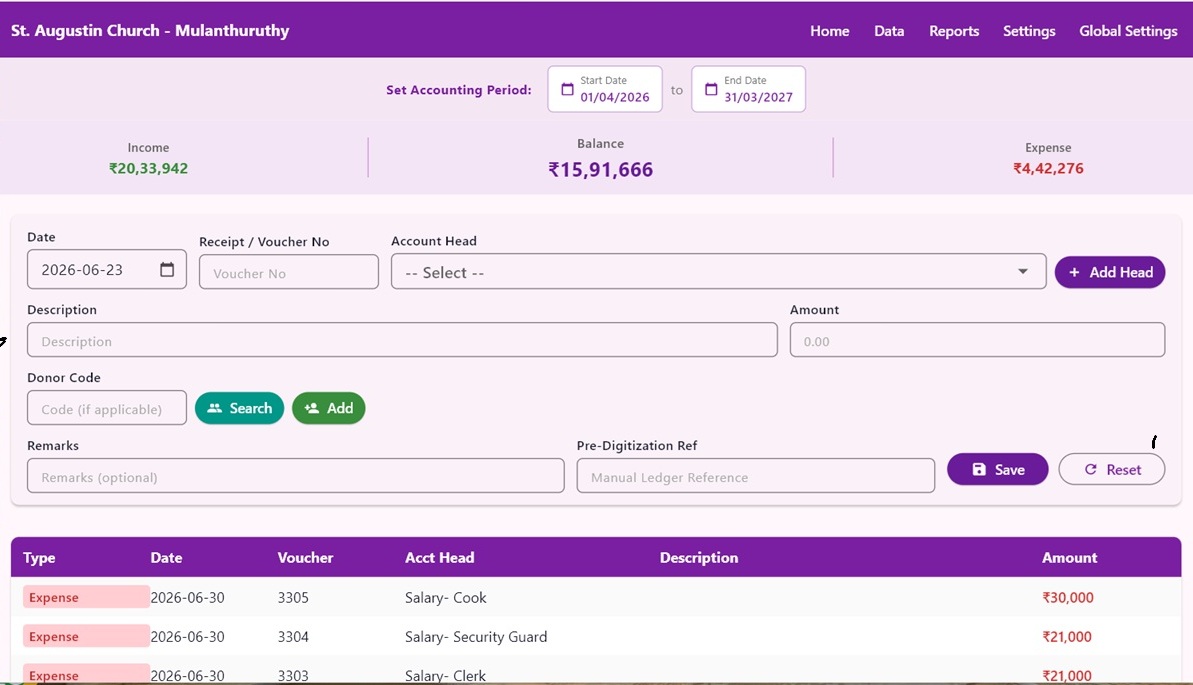
Secure Ledger — Dashboard view